Pligg Auto Submitter Released

This is a couple of days old now, so forgive me for writing this post a little late. I did start it over the weekend when i got news of the release but didn’t finish my blog post until today.

Saturday saw the release of Syndk8’s Auto Pligg Submitter, for those who aren’t aware, Syndk8 is pretty much the top black forum on the net and Pligg is a sort of content management system which is effectively a clone of the much loved Digg.com. Pligg allows members to submit news stories about various topics and then vote and comment on said stories. This in turn effects what shows up on the front page, and how long for, its a social media news site.

The Pligg Auto submitter is being sold for $189 which for what it actually does is peanuts. Basically the software will allow you to mass spam almost any Pligg based site out in the wild. You would be forgiven in thinking that it isn’t a big deal until you realise that some high profile sites such as Sphinn.com are using the Pligg engine.

Lets look at some of the features that the Pligg spammer (i mean auto submitter) has…

  • Automatically register for accounts. Even breaks CAPTCHAs!!
  • Create UNLIMITED profiles and identities
  • Submit stories and comment to 1000’s of sites
  • Automated pinging after each submission
  • Stats to show succesful submissions
  • Proxy support

So as you can see, it’s a pretty rounded product, and the big thing here is that it can break captcha’s which is a pretty big deal in the world of spamming. Basically you are getting a piece of software which can automate the posting of hundreds of stories and links back to your site without you hardly lifting a finger.

So lets look at this from the point of spamming and building your site up, you could spend $180 on this product and be able to spam a hell of a lot of sites and get some decent links in or you could spend $180 one ok quility link. If you do a Google Search for “powered by pligg” you can see that the results number in the 1,380,000 range. Even if you assume that 25% of those sites no longer exist then you still have a massive amount of sites at your disposal to spam. Lets also check out the number of Google Searches going on at the moment…

As you can see from the image above, even though this software has only been out for four days, the amount of people searching for “powered by pligg” to spam the sites is pretty high, so what can webmasters do about it?

  • Remove the “powered by pligg” footprint in your template
  • Take a look at using ReCaptcha instead of Pliggs built in Captcha system, there is a (sort of) guide on the Pligg forum
  • Add in another layer of capture which asks a questions such as “is water a liquid or gas?”
  • Ensure that you monitor the number of users in the admin area, if you see this number shooting up then its safe to say that you are being targetted
  • Like the above point, watch to see the number of stories being submitted, if they jump up then you are probably being targetted

I would imagine that within the next couple of releases Pligg will probably address a lot of the loopholes that the auto submitter is using to work, however it seems that this is an on going project from Syndk8 so it looks like this battle will last for some time. I must admit the Pligg development cycle can be a bit hit and miss so only time will tell what will happen.

In closing, i have tried to write this post from both the positive view points of a spammer and also the negative viewpoints of a Pligg admin, who knows, i may even use this software to promote my own Pligg based site 🙂

If you liked this post give it a Sphinn over at Sphinn.com

Use your Facebook Profile on Digg

Facebook have recently been holding a conference in the States called F8, it is basically a conference for Facebook developers to attend to see what the big FB are doing over the next year on their development platform, one of the major things to come out about using the Facebook connect system is that developers will be able to use the system for their applications on the iPhone. The other big announcement comes from the Digg blog, which tells us that Facebook users will now be able to login to Digg and vote on stories using their Facebook profile credentials. The really cool thing about this is that as you Digg stories they get published to your mini feed.

I think that this could really help diversify the power users who manage to always get their stories to the front page of Digg. If Digg can gain a ton more exposure to the general public (as opposed to marketers and people in the tech industry) then i am sure that the kind of stories making the front page will change. Not only that, if 100 of my friends finally understand what Digg is and then see that i have posted/voted on a story then they may even Digg it up.

I really do hope that Digg will allow users to combine thier current Digg accounts in the Facebook profile as it is something that really appeals to me, however at this time the blog doesn’t say anything about that.

If you are unsure exactly what Facebook connect is then basically… Through Facebook Connect members can use their Facebook identities across the Web–profile photos, names, photos, friends, groups, events, and other information. Facebook profile content, for example, could appear on other social sites, and Facebook event listings could theoretically connect with external event and invitation services. Flickr and Yelp are two such websites using Facebook connect and can post information onto users walls.

Update WordPress with new app for iPhone

My friend who runs an Equestrian Blog nudged me about this today… Typepad have had an app on the iPhone app store since launch, but WordPress have been a little slow to get theirs out the door. However, on the same day that Facebook launch the newly redesigned interface, WordPress have got their finger’s out released the iPhone app.

All in all it is pretty basic, quite obviously the app is free and it installs in a matter of seconds. WordPress tells us the app includes the following features…

  • Support for wordpress.com and self hosted blogs
  • Embedded Safari for post previews
  • Full support for tags and categories
  • Photo support for camera and library pics
  • Multiple blog support
  • Auto recovery feature for when your draft is interrupted by a phone call
Writing a post

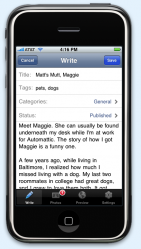
So what better way to test the software than to write this post? Other than me making a ton of mistakes by using the iPhone keypad, the software is stupidly easy to use. You simply setup your blog login details and then hit save. The next list displays the last X number of posts that were written (where x is the number you set in the options), and also gives you access to the local drafts folder. One thing i did notice is that if you are writting a draft on the PC version and don’t publish it (you simply hit save and leave it in the drafts) then you CANNOT edit it on your iPhone. The iPhone version keeps a local copy of drafts. This is a bit of a let down if you ask me because it would work much better if i could just pick up a post where i left off either on my pc or phone.

The actual interface for writting a post has 4 options along the bottom; Write, Photos, Preview, Settings. The write options obviously allows you to write the post, only with the title’s, categories etc etc.

Photo’s lets you select a photo from your images library on the iPhone or take a snap directly with the camera, both work really well.

Preview shows you the post in Safari (but keeps you in the WordPress app)

Finally settings allows you to password protect the post, or set a date that it should be published.

As i keep saying it is simple, but it does allow you to live blog from events and such quite easily, also if you can use it as a quick sort of bloging notepad to take down ideas for a post and then complete it at a later date.

My only gripe is not being able to edit draft posts from outside the app, and vice versa with the pc. This needs to be fixed.

Also, i must admit i cheated a little and edited this post on the pc to sort out the bullet list and add some more content. It does take a while to write on the iPhone… keep your posts short 🙂

You can get more info from http://iphone.wordpress.org/ or just search the app store in iTunes or on your iPhone for WordPress.

My Top 10 iPhone 3g Apps

After last weeks fun and games trying to get my iPhone delivered on time and then sprucing up the design on this blog, i haven’t really had a chance to post anything for a week around here. I though i would get back into the swing of things from where i left off… talking about the iPhone.

So the little beauty is here, 16gb black. I have had a few days to play around with it now and i must say i am pretty impressed. The black back is a lot nicer, and you can tell that the phone is lighter and thinner when you pick it up. The GPS is pretty damn good and finds you instantly, and of course i am loving the app store… which brings me to my top 10 apps.

10) Pandora (USA Only)
Pandora is an automated music service which allows users to type in an artist or song, and it will then return a ton of other songs related to your ‘search term’. The music quality has always been high, but as i mentioned in the title you can only use it in the USA which is kinda crappy.

9) Tap Tap Revenge (Free)
Tap Tap revenge is basically guitar hero for a mobile phone. Obviously you don’t have the option of strumming to the beat, but instead you tap to the beat. Its a cool little app but the problem is that you are limited to the number of songs you can tap away too. Interestingly enough the installer version actually lets you tap away to the songs in your library, the ‘official’ app version does not. I think Apple have restricted apps to only accessing data they create or the geo tagging part of the gps.

8 ) Lastminute.com Learn French (Free)
You could change the learn French to Spanish or Italian because lm.com do an application for all three languages. This little app not only helps you learn the language but can also be used as a quick reference when you are away. The phrases are arranged by situation type (e.g ordering food, asking for hotel, romance) which you then simply select and are given a number of phrases to address the situation. The software also allows you to hit a little speaker button which obviously then speaks aloud the phrase. The sound quality is very good which makes this app rank higher than its lonely planet counter parts.

7) Screenshot (NA)
Whilst not technically an app, it is a function which you can only do in the 2.0 version of the firmware Basically you can take a screen shot of the iPhone screen by simply holding down the home button and then hitting the sleep/lock button on the top. A white flash appears and then your image is saved into the camera roll.

6) Zintin (Free)
Zintin is a geo Social Networking application. It basically locates where you are in the world and then shows you a list of other people in the same area. You can then post images and text into their wall, or even swap contact information. Its all quite basic at the moment but i could certainly see this being an awesome application at a festival or so. The app needs more features but i certainly think that Geo Social Networking will take off in a big way soon.

5) Last.fm (Free)
Last.fm is pretty much the same idea as Pandora except that it works in the UK too. You can create some cool play lists and you get music which should match your tastes. The app also allows you to download your favorite tracks from the iTunes store.

4) Twitteriffic (Free)
A nice little app for allowing you to tweet on twitter. The only problem is that it is not as good as Twinkle which was available through installer. It still gives you the option of the geo tagging though so can be used in the same way as Zintin. Its basically just twitter mobile.

3) Shazam (Free)
Ever heard a song that you really really like but don’t know the name of it? Well Shazam is hear to help. This is the new and free version of Shazam. Instead of dialling 2580 and holding your phone up to some speakers, you just open the Shazam app and hold the phone in the air. The nifty software then identifies the tune and whisks you off to the iTunes store to purchase it.

2) Vicinity (£1.79)
I love vicinity so much and it was so close to taking the number 1 spot, however there are still some minor issues with the application and the data that it presents. Lets take a look at some of the stuff it can do though. Basically Vicinity provides access to a whole host of services in your current area, you just hit the locate me button and the app pulls down a ton of information for you such as pubs, restaurants, takeaways, taxis and banks. What is even more amazing is it then pulls down Wikipedia articles about your surrounding area and also Flickr and Panaramoio images.

As i mentioned at the start, the data can be slightly out of date so it would be awesome if they allowed users to participate in making sure the data is correct. This is one of those apps that you can pull out whilst waiting for a friend in the pub and egg up on your surroundings. A must have!

1) Remote (Free)
So we finally get to number 1, and its an app made by Apple, are you really supprised?
Remote is simply amazing, and i have not shown it to anyone who hasn’t ended up saying wow. Basically it allows you to sync with iTunes or Apple TV and then take control of the playing device with your iPhone.
It works over wifi so you can control your music and tv from anywhere in the house. It streams down the album artwork and playlists so you have the full experience right in front of you. It also works with the Apple Airtune speakers to keep completely in control. You really need to download this to beleive how well it works so stop reading and hit the app store now.
So there you have it, my top apps. I am hoping that there will be many many more released in the next coming months, and to be honest i really can see the app storm blowing up into massive proportions. Leave me a comment or two if you think i missed any apps.