
SofaBaton X2 + Home Assistant: MQTT is a Disaster, Here’s How to Fix It

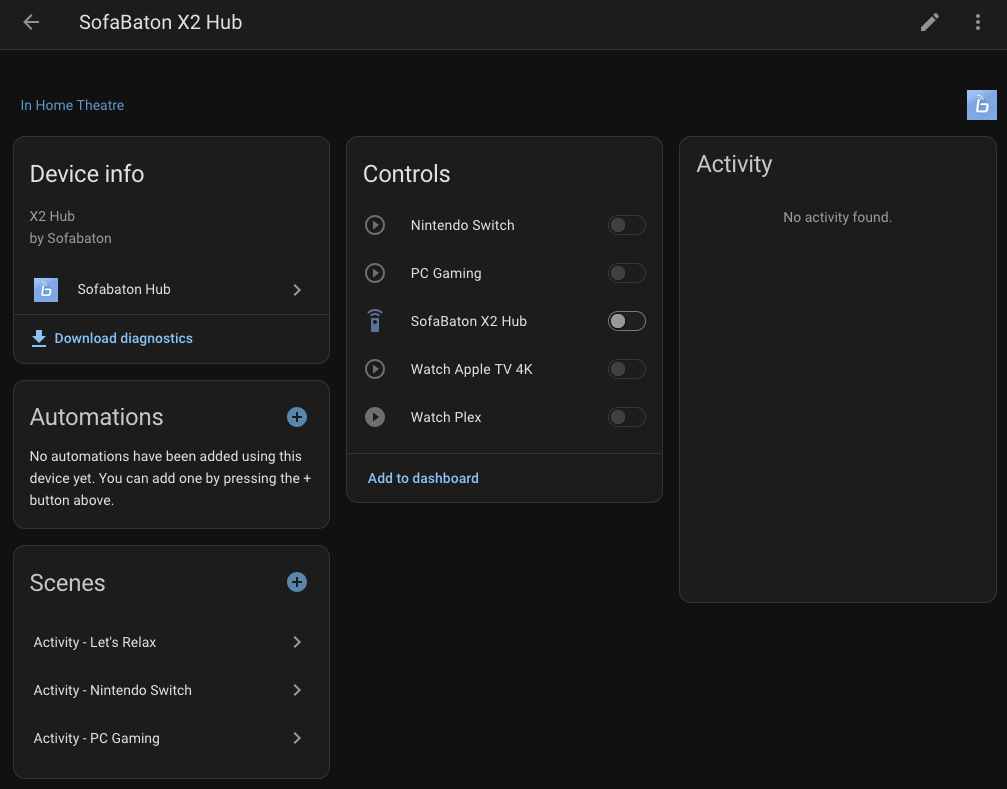
So I’ve been doing a pretty major overhaul of my smart home setup, moving everything into Home Assistant as the “brain” and then exposing devices back to Apple Home via the HomeKit Bridge integration. Part of this involved getting my SofaBaton X2 hub and remote properly integrated into HA.
What followed was one of the more frustrating afternoons I’ve had with smart home tech in a while. Here’s exactly what went wrong, what I found, and how I fixed it properly.
The Setup
- SofaBaton X2 Hub: a pretty capable universal remote hub with activity-based control
- Home Assistant: running on a VM (moving to HA Green soon)
- Mosquitto MQTT Broker: installed as an HA app
- ha-sofabaton-hub: HACS integration by yomonpet
The idea is simple, when I switch activities on the SofaBaton remote (Watch Plex, Nintendo Switch, PC Gaming, Apple TV 4K), I want HA to know about it so it can keep everything in sync. And conversely, when I trigger a scene in HA or Apple Home, I want the SofaBaton to switch to the correct activity automatically.
Sounds simple. It was not.
The Problem
After installing the HACS integration and Mosquitto broker, everything appeared to work initially. The SofaBaton hub connected to MQTT, activities were showing in HA, and I could switch between them. Happy days.
Then I restarted Home Assistant.
The SofaBaton hub completely disappeared. All activity toggles greyed out. Warnings started appearing in the HA logs:
Basic data request timeout for FC012C39D308
Timeout waiting for activity list for FC012C39D308 (waited 10 seconds)
After some digging in the Mosquitto logs it became clear what was happening — the hub was not reconnecting to MQTT after HA restarts. The connection would drop when Mosquitto restarted, and the SofaBaton hub simply never came back on its own.
The only way to get it working again was to open the SofaBaton iOS app, go into the MQTT settings, and toggle the connection off and on. Not exactly a family-friendly solution when your partner is wondering why the remote stopped working.
Diagnosing the Issue
First, I confirmed the MQTT connection was the problem by listening to all topics in the MQTT settings panel in HA (# wildcard) and firing activities on the remote. Nothing. Not a peep.
Opening the Mosquitto logs confirmed it:
New connection from 192.168.0.23:63022 on port 1883.
New client connected from 192.168.0.23:63022 as sofabaton_XXXXXXXXXXXX (p2, c1, k1000, u'SofaBaton').
The c1 in that log entry is the key — it means clean session = true. The SofaBaton hub is hardcoded to tell Mosquitto to forget it exists every time it disconnects. So when Mosquitto restarts, the hub has to actively reconnect, and it simply doesn’t do this automatically.
There are no settings in the SofaBaton iOS app to change this behaviour. You get a host, port, username and password field, and that’s it. No persistent session option. No auto-reconnect toggle. Nothing.
I also tried power cycling the hub to see if that would trigger a reconnect. It didn’t.
The Firmware Update That Changed Everything
Before giving up entirely, I checked for a firmware update on the hub via the SofaBaton iOS app. There was one. I installed it.
After the update, the hub did reconnect automatically to MQTT, which was great news. However, something else had changed. The MQTT topic format had been completely updated by the new firmware:
Old topic (pre-firmware):
sofabaton/XXXXXXXXXXXX/...New topic (post-firmware):
activity/XXXXXXXXXXXX/activity_control_upNew payload format:
json
{"activity_id":102,"state":"on"}This completely broke the HACS integration, which was still expecting the old topic format. The integration hasn’t been updated in 5+ months and the custom Lovelace card became unusable, clicking on the entity in the card config did nothing.
Honestly, at this point the HACS integration was more trouble than it was worth.
The Fix: Bypass the Integration Entirely
Since I now knew the exact MQTT topic and payload format, I decided to ditch the HACS integration entirely and build the solution properly using:
- Direct MQTT triggers for physical remote → HA (so HA knows when an activity is selected on the remote)
- SofaBaton Cloud API for HA → SofaBaton (so HA can trigger activities without needing MQTT to be in a specific state)
The SofaBaton iOS app has an API Interface section that gives you cloud API URLs for each activity. These work regardless of MQTT state:
https://app1.sofabaton.com/app/keypress2?node_id=YOUR_NODE_ID&id=Watch Plex&type=1type=1 = turn on, type=0 = turn off.
Step 1: Add REST Commands to Home Assistant
Create a packages folder in your HA config directory and add a sofabaton.yaml file inside it. First, add this to your configuration.yaml:
yaml
homeassistant:
  packages: !include_dir_named packages
Then create /config/packages/sofabaton.yaml with the following (replace YOUR_NODE_ID with the node ID from your SofaBaton API Interface screen):
yaml
rest_command:
  sofabaton_nintendo_switch_on:
    url: "https://app1.sofabaton.com/app/keypress2?node_id=YOUR_NODE_ID&id=Nintendo Switch&type=1"
    method: GET
  sofabaton_nintendo_switch_off:
    url: "https://app1.sofabaton.com/app/keypress2?node_id=YOUR_NODE_ID&id=Nintendo Switch&type=0"
    method: GET
  sofabaton_watch_appletv_on:
    url: "https://app1.sofabaton.com/app/keypress2?node_id=YOUR_NODE_ID&id=Watch Apple TV 4K&type=1"
    method: GET
  sofabaton_watch_appletv_off:
    url: "https://app1.sofabaton.com/app/keypress2?node_id=YOUR_NODE_ID&id=Watch Apple TV 4K&type=0"
    method: GET
  sofabaton_watch_plex_on:
    url: "https://app1.sofabaton.com/app/keypress2?node_id=YOUR_NODE_ID&id=Watch Plex&type=1"
    method: GET
  sofabaton_watch_plex_off:
    url: "https://app1.sofabaton.com/app/keypress2?node_id=YOUR_NODE_ID&id=Watch Plex&type=0"
    method: GET
  sofabaton_pc_gaming_on:
    url: "https://app1.sofabaton.com/app/keypress2?node_id=YOUR_NODE_ID&id=PC Gaming&type=1"
    method: GET
  sofabaton_pc_gaming_off:
    url: "https://app1.sofabaton.com/app/keypress2?node_id=YOUR_NODE_ID&id=PC Gaming&type=0"
    method: GET
Do a Developer Tools → YAML → Check Configuration and then a Quick Reload to load the new rest commands without a full restart.
Step 2: Find Your Activity IDs
Open the MQTT listener in HA (Settings → Devices & Services → MQTT → Configure → Listen to a topic) and listen to #. Then press each activity button on the physical remote and note the activity IDs that appear in the payload. Mine were:
101= Watch Apple TV 4K102= Watch Plex103= PC Gaming104= Nintendo Switch255= Power Off
Step 3: Create Input Booleans
Create one input_boolean helper per activity in HA (Settings → Devices & Services → Helpers → Create Helper → Toggle). These act as the state indicators and can be exposed to Apple Home as switches:
input_boolean.sofabaton_watch_plexinput_boolean.sofabaton_watch_apple_tv_4kinput_boolean.sofabaton_pc_gaminginput_boolean.sofabaton_nintendo_switch
Step 4: The Master Automation
This single automation replaces all the previous SofaBaton automations and handles everything in both directions, physical remote → HA state sync, and HA/HomeKit → SofaBaton activity switching.
Replace XXXXXXXXXXXX with your hub’s MAC address (visible on the sticker on the bottom of the hub):
yaml
alias: SofaBaton - Activity Control
description: Controls SofaBaton via cloud API and syncs state from physical remote via MQTT
triggers:
  - trigger: mqtt
    topic: activity/XXXXXXXXXXXX/activity_control_up
    id: remote_pressed
  - trigger: state
    entity_id: input_boolean.sofabaton_watch_apple_tv_4k
    from: "off"
    to: "on"
    id: watch_appletv
  - trigger: state
    entity_id: input_boolean.sofabaton_watch_plex
    from: "off"
    to: "on"
    id: watch_plex
  - trigger: state
    entity_id: input_boolean.sofabaton_pc_gaming
    from: "off"
    to: "on"
    id: pc_gaming
  - trigger: state
    entity_id: input_boolean.sofabaton_nintendo_switch
    from: "off"
    to: "on"
    id: nintendo_switch
  - trigger: state
    entity_id:
      - input_boolean.sofabaton_watch_apple_tv_4k
      - input_boolean.sofabaton_watch_plex
      - input_boolean.sofabaton_pc_gaming
      - input_boolean.sofabaton_nintendo_switch
    from: "on"
    to: "off"
    id: power_off
conditions: []
actions:
  - choose:
      - conditions:
          - condition: trigger
            id: remote_pressed
          - condition: template
            value_template: "{{ trigger.payload_json.activity_id == 101 and trigger.payload_json.state == 'on' }}"
        sequence:
          - action: input_boolean.turn_on
            target:
              entity_id: input_boolean.sofabaton_watch_apple_tv_4k
          - delay:
              milliseconds: 300
          - action: input_boolean.turn_off
            target:
              entity_id:
                - input_boolean.sofabaton_watch_plex
                - input_boolean.sofabaton_pc_gaming
                - input_boolean.sofabaton_nintendo_switch
      - conditions:
          - condition: trigger
            id: remote_pressed
          - condition: template
            value_template: "{{ trigger.payload_json.activity_id == 102 and trigger.payload_json.state == 'on' }}"
        sequence:
          - action: input_boolean.turn_on
            target:
              entity_id: input_boolean.sofabaton_watch_plex
          - delay:
              milliseconds: 300
          - action: input_boolean.turn_off
            target:
              entity_id:
                - input_boolean.sofabaton_watch_apple_tv_4k
                - input_boolean.sofabaton_pc_gaming
                - input_boolean.sofabaton_nintendo_switch
      - conditions:
          - condition: trigger
            id: remote_pressed
          - condition: template
            value_template: "{{ trigger.payload_json.activity_id == 103 and trigger.payload_json.state == 'on' }}"
        sequence:
          - action: input_boolean.turn_on
            target:
              entity_id: input_boolean.sofabaton_pc_gaming
          - delay:
              milliseconds: 300
          - action: input_boolean.turn_off
            target:
              entity_id:
                - input_boolean.sofabaton_watch_apple_tv_4k
                - input_boolean.sofabaton_watch_plex
                - input_boolean.sofabaton_nintendo_switch
      - conditions:
          - condition: trigger
            id: remote_pressed
          - condition: template
            value_template: "{{ trigger.payload_json.activity_id == 104 and trigger.payload_json.state == 'on' }}"
        sequence:
          - action: input_boolean.turn_on
            target:
              entity_id: input_boolean.sofabaton_nintendo_switch
          - delay:
              milliseconds: 300
          - action: input_boolean.turn_off
            target:
              entity_id:
                - input_boolean.sofabaton_watch_apple_tv_4k
                - input_boolean.sofabaton_watch_plex
                - input_boolean.sofabaton_pc_gaming
      - conditions:
          - condition: trigger
            id: remote_pressed
          - condition: template
            value_template: "{{ trigger.payload_json.activity_id == 255 }}"
        sequence:
          - action: input_boolean.turn_off
            target:
              entity_id:
                - input_boolean.sofabaton_watch_apple_tv_4k
                - input_boolean.sofabaton_watch_plex
                - input_boolean.sofabaton_pc_gaming
                - input_boolean.sofabaton_nintendo_switch
      - conditions:
          - condition: trigger
            id: watch_appletv
        sequence:
          - action: rest_command.sofabaton_watch_appletv_on
          - delay:
              milliseconds: 300
          - action: input_boolean.turn_off
            target:
              entity_id:
                - input_boolean.sofabaton_watch_plex
                - input_boolean.sofabaton_pc_gaming
                - input_boolean.sofabaton_nintendo_switch
      - conditions:
          - condition: trigger
            id: watch_plex
        sequence:
          - action: rest_command.sofabaton_watch_plex_on
          - delay:
              milliseconds: 300
          - action: input_boolean.turn_off
            target:
              entity_id:
                - input_boolean.sofabaton_watch_apple_tv_4k
                - input_boolean.sofabaton_pc_gaming
                - input_boolean.sofabaton_nintendo_switch
      - conditions:
          - condition: trigger
            id: pc_gaming
        sequence:
          - action: rest_command.sofabaton_pc_gaming_on
          - delay:
              milliseconds: 300
          - action: input_boolean.turn_off
            target:
              entity_id:
                - input_boolean.sofabaton_watch_apple_tv_4k
                - input_boolean.sofabaton_watch_plex
                - input_boolean.sofabaton_nintendo_switch
      - conditions:
          - condition: trigger
            id: nintendo_switch
        sequence:
          - action: rest_command.sofabaton_nintendo_switch_on
          - delay:
              milliseconds: 300
          - action: input_boolean.turn_off
            target:
              entity_id:
                - input_boolean.sofabaton_watch_apple_tv_4k
                - input_boolean.sofabaton_watch_plex
                - input_boolean.sofabaton_pc_gaming
      - conditions:
          - condition: trigger
            id: power_off
          - condition: state
            entity_id: input_boolean.sofabaton_watch_apple_tv_4k
            state: "off"
          - condition: state
            entity_id: input_boolean.sofabaton_watch_plex
            state: "off"
          - condition: state
            entity_id: input_boolean.sofabaton_pc_gaming
            state: "off"
          - condition: state
            entity_id: input_boolean.sofabaton_nintendo_switch
            state: "off"
        sequence:
          - delay:
              milliseconds: 500
          - condition: state
            entity_id: input_boolean.sofabaton_watch_apple_tv_4k
            state: "off"
          - condition: state
            entity_id: input_boolean.sofabaton_watch_plex
            state: "off"
          - condition: state
            entity_id: input_boolean.sofabaton_pc_gaming
            state: "off"
          - condition: state
            entity_id: input_boolean.sofabaton_nintendo_switch
            state: "off"
          - action: rest_command.sofabaton_watch_appletv_off
          - action: rest_command.sofabaton_watch_plex_off
          - action: rest_command.sofabaton_pc_gaming_off
          - action: rest_command.sofabaton_nintendo_switch_off
mode: queued
max: 5
A note on the power off logic; the 500ms delay followed by re-checking all booleans is intentional. Without it, switching between activities would incorrectly trigger a full power off because turning one activity on briefly leaves all booleans in an off state while the new one turns on.
The End Result
- ✅ Physical remote button press → MQTT → HA booleans update → Apple Home reflects correct state
- ✅ Apple Home / HA scene triggers boolean → REST API call → SofaBaton switches activity
- ✅ Works after HA restarts (MQTT reconnect fixed by firmware update)
- ✅ No dependency on the buggy HACS integration
- ✅ No custom card required
The HACS integration (ha-sofabaton-hub) is essentially dead at this point, 5 months without an update, the new firmware broke the topic format, and the Lovelace card is non-functional. If you’re starting fresh, skip it entirely and use the approach above.
If you’re on the AVS Forum thread or the HA Community thread about the X2 and have been tearing your hair out, hopefully this saves you a few hours. 👊
Comments are closed.